
Mila-wall Designer
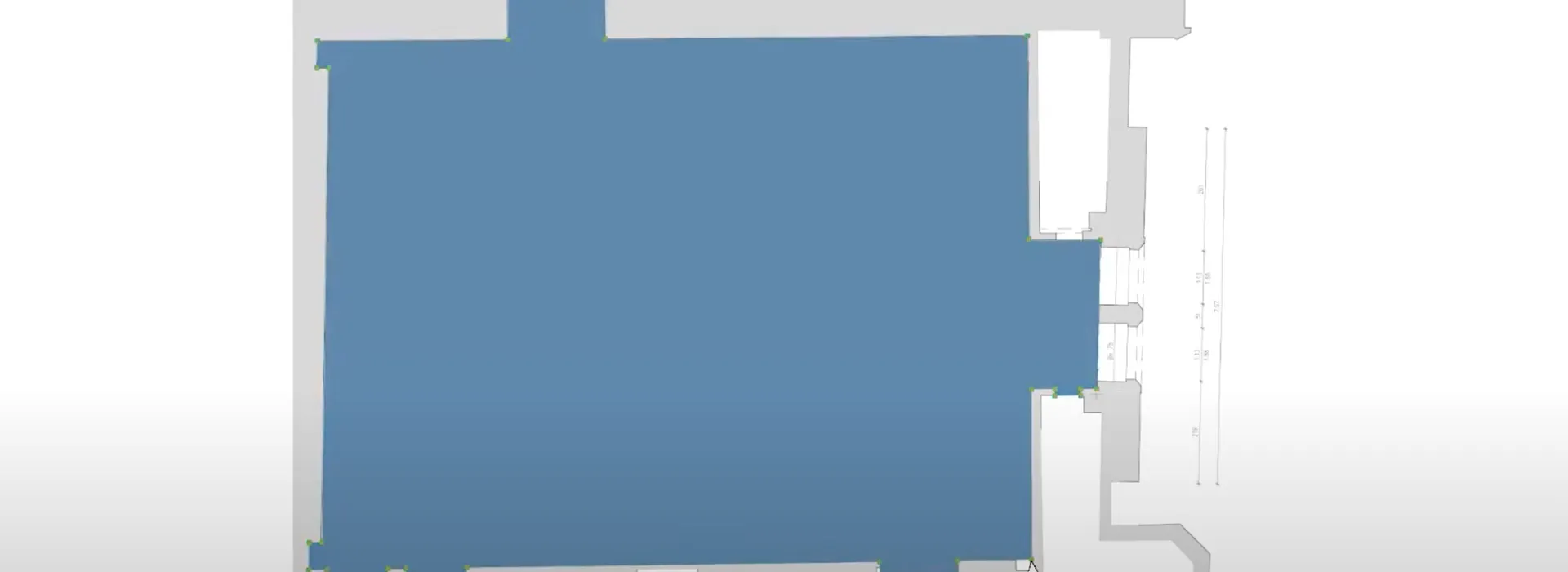
Der Mila-wall Designer ist die Planungssoftware für Ausstellungen, Galerien und Messestände. Von der Idee bis zur realistischen Darstellung sind nur wenige Schritte nötig. Du importierst den Gebäudeplan, platzierst Mila-wall Wände an der gewünschten Position, vergibst Farben und prüfst die Wirkung sofort im Raum. Exponate, Lichtquellen und Objekte wie Vitrinen ziehst du per drag and drop in das Layout und erhältst dynamische Bemaßung sowie PDF Abwicklungen für die Produktion und die Hängung.
Warum der Mila-wall Designer
Planende benötigen verlässliche Abläufe, klare Kommunikation und exakte Unterlagen. Der Mila-wall Designer verbindet schnelle Entwurfsarbeit mit realitätsnaher Visualisierung und lieferfähigen Ausgaben. So werden Entscheidungen sicherer, Schleifen kürzer und Übergaben an Werkstatt, Aufbau und Kuratierung einfacher.
Vorteile im Überblick:
- Gebäudeplan importieren und sofort mit Mila-wall arbeiten
- Wände, Türen, Fenster und Vitrinen frei platzieren und färben
- Exponate und Lichtquellen per drag and drop aus angebundenen Datenbanken
- PDF Abwicklungen für Montage, Hängelisten und Freigaben
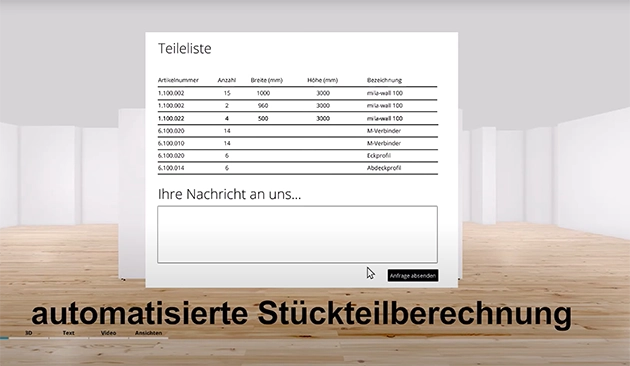
- Interaktive Aufbauanleitungen und automatisierte Stückteilberechnung
Funktionen im Detail
Architektur und Layout
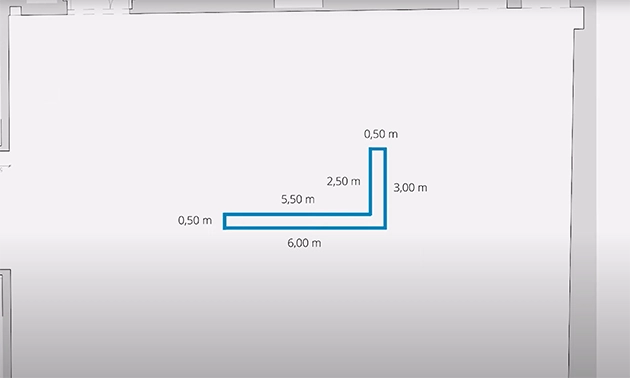
Importiere den Gebäudegrundriss und platziere Mila-wall Module in Linien, Ecken und Räumen. Wechsle zwischen Draufsicht, Ansicht und realistischer Darstellung. Weise Gebäude und Stellwänden individuelle Farben zu und prüfe Sichtachsen, Wege und Zonierung.Exponate, Licht und Objekte
Binde Exponate aus verknüpften Kunstdatenbanken ein und positioniere sie per drag and drop. Ergänze Lichtquellen und Ausstattungen wie Vitrinen, Sockel oder Medienstationen. Prüfe Wirkung und Lesbarkeit im Raum.Bemaßung und Ausgaben
Erzeuge dynamische Maße direkt im Modell. Exportiere PDF Abwicklungen für Wandzüge und Hängepläne. Leite Stücklisten und Übersichten für die Logistik ab und übergib klare Unterlagen an Aufbau und Produktion.Rahmen und Passepartout
Lege Rahmentypen und Passepartout Vorgaben fest und übernimm diese Einstellungen in die Hängung. So bleiben Reihen und Raster einheitlich und reproduzierbar.
Testversion, Miete oder Kauf
Jetzt testen
Wir stellen eine kostenlose Testversion zur Verfügung. Der Testzeitraum umfasst fünf Tage ab Aktivierung. Du erhältst auf Anfrage einen Lizenzcode.
Lizenzmodelle
- Miete 180 Euro pro Monat, monatlich kündbar
- Kauf 3500 Euro einmalig
Webinare und Unterstützung
Gerne bieten wir ein individuelles Webinar an. Darin zeigen wir die wichtigsten Funktionen, den typischen Workflow und beantworten Fragen zu Import, Bemaßung, Abwicklung und Ausgabe.
Kontakt für Webinartermine: Daniel Hoffmann
Systemvoraussetzungen
Die Systemanforderungen findest du im Dokument Systemvoraussetzungen. Bitte prüfe vor der Installation Prozessor, Arbeitsspeicher, Grafikkarte und freien Speicherplatz.
Für wen der Mila-wall Designer gedacht ist
- Kuratorinnen und Kuratoren, die Inhalte und Hängungen präzise planen möchten
- Gestalterinnen und Gestalter in Museen, Galerien und im Messebau
- Produktionsleitungen, die klare Abwicklungen und Stücklisten benötigen
- Vertrieb und Beratung, die mit realistischen Ansichten schneller Entscheidungen erhalten
Häufig gestellte Fragen
Kann ich bestehende Grundrisse verwenden?
Ja. Du importierst den Gebäudeplan und arbeitest darauf direkt mit Mila-wall Modulen.
Wie platziere ich Exponate und Lichtquellen?
Über die Anbindung an Datenbanken ziehst du Objekte per drag and drop in den Raum und passt Position und Ausrichtung an.
Eignet sich die Software für Hängepläne?
Ja. Du erzeugst PDF Abwicklungen mit dynamischer Bemaßung und kannst Positionen für Haken, Raster und Texttafel festlegen.
Welche Lizenz passt zu mir?
Für projektbezogene Nutzung empfiehlt sich die Miete. Für dauerhafte Nutzung ist der Kauf sinnvoll. Die fünftägige Testversion hilft bei der Entscheidung.
Request a demo appointment
We will send you a sample with small original walls by post in advance. During the video appointment you have the sample in your hands while we explain assembly, feel and possible uses live using the sample. Simply choose your appointment in the calendar now.